
Smart Labels
QR Smart LabelsHouse & Home
4.8212.00 Reviews
- Version
- 15.1.1
- Installs
- 10.00K
- Age Rating
- Everyone
Screenshots
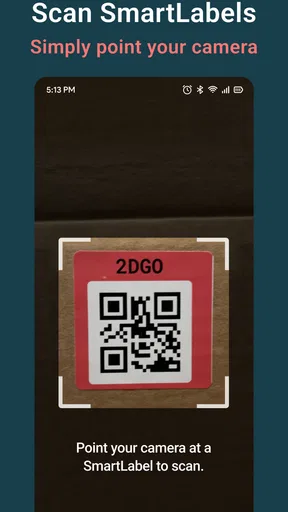
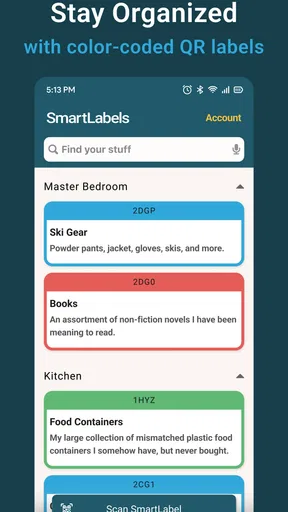
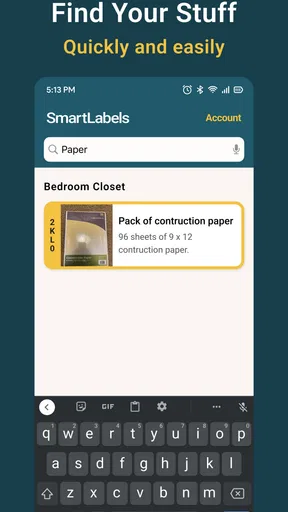
Our Review of Smart Labels
 Analysis by Appyee
The first few days with Smart Labels can feel like a small domestic reset. You pick a shelf, drawer, or box that has become a guessing game, give its contents a clearer identity, and suddenly the next search seems less annoying. I like that promise, but I also think the real test is not how satisfying labeling feels on day one. It is whether the system still helps once the novelty wears off and keeping it accurate becomes part of the routine.
A quick win, if you start small
My advice is to resist the urge to label the whole home at once. Choose one place where confusion costs you time: a pantry shelf, a shared supply drawer, or a storage box you open only occasionally. A modest first project lets you judge whether QR-based labels suit the way you actually look for things, before you spend an afternoon building an inventory that may be too ambitious to maintain.
A useful first label should answer a practical question, not merely name a broad area. “Baking supplies” may be enough for one shelf, while a box of spare cables may benefit from a more specific description. The best level of detail depends on how often you need to distinguish one item from another. If the label forces you to record every small object, the setup can become more work than the search it is meant to prevent.
Where the routine can earn its keep
For a household with several people, the value is less about making a home look tidy and more about reducing repeated questions. Imagine a family member looking for a spare bulb while you are out. A clear, current label can point them to the right box without relying on your memory. The same idea can help roommates keep shared kitchen or cleaning supplies in predictable places, provided everyone agrees to put things back where the labels say they belong.
It can also help with seasonal storage. If you label a box when you pack it away, you have a better chance of finding the relevant decorations or cold-weather accessories later without opening several containers. The trade-off is that a label only stays useful if you revise it when the contents change. For a box that gets reorganized every few weeks, a simple handwritten note may be quicker and less fussy.
Choose the right level of commitment
Compared with a paper list or a basic notes app, QR labels offer a more direct connection between a physical container and the information you keep about it. That can be handy when several similar bins are stacked together. A spreadsheet, meanwhile, may suit someone who wants a broad inventory and likes editing many entries at once. Smart Labels is most appealing when you want to identify particular storage spots as you encounter them, rather than build a complete catalogue before it becomes useful.
That distinction matters when deciding who should skip it. If you rarely forget where household items are, or you move things around constantly, an organized set of QR labels may feel like another system to tend. It is also a poor match for anyone who wants an inventory to stay current without personal upkeep. I would begin with a few high-friction locations and expand only after those labels have proved useful over time.
Getting Started with Smart Labels
First things first, downloading Smart Labels is super straightforward. It’s available for both Android and iOS, and the installation process is a breeze. Once you open the app, you're greeted with a clean, intuitive interface that makes you feel right at home. The onboarding process is smooth, guiding you through the setup without any hiccups. Seriously, even my tech-challenged uncle could navigate this without a hitch.
Features That Stand Out
What really caught my attention are the app's features. You can create labels for literally anything – from pantry items to office supplies. The customization options are pretty impressive. You can change colors, add icons, and even attach photos to your labels. It’s like having your personal label maker in your pocket.
Another cool feature is the cloud sync. Your labels are saved across devices, so you can start labeling on your phone and finish on your tablet. Plus, if you’re someone who loves sharing (or flaunting) your organization skills, you can share labels with family or colleagues. It’s perfect for collaborative projects or just keeping everyone on the same page.
Using Smart Labels in Everyday Life
So, how does it fare in daily use? Pretty darn well, if you ask me. I tried it in my kitchen, labeling my spices and pantry items. No more confusing coriander with cumin! And when I reorganized my workspace, the app helped me keep track of all those random cables and chargers. The best part? No more scrambling through drawers trying to find that one elusive item.
The app also has a nifty search feature. Type in what you’re looking for, and it’ll pop right up. It’s like Google for your home inventory. And let’s not forget about the notifications. You can set reminders for when items need restocking or when your labels need updating. It’s like having a personal assistant nudging you to keep things in check.
Maintenance is the real test
The simplest way to keep an inventory trustworthy is to update it at the moment something changes. If you take the last packet from a labeled pantry container, make the correction while you are already putting groceries away, rather than expecting yourself to remember later. For occasional storage, a short note that describes the box’s main contents may be more durable than a detailed list that becomes outdated after one item is moved.
Photos can help distinguish similar containers, but they are most useful when they show something the written label cannot: a distinctive lid, a particular shelf, or a collection that is hard to describe briefly. They are less helpful if you feel obliged to photograph every object. I’d treat them as visual clues, not as a second record-keeping job.
When the system starts to feel like work
One possible source of fatigue is over-labeling. If every small item gets its own entry, you may spend more time maintaining the catalogue than finding things. Another is inconsistent naming: calling a box “tools” one week and “garage supplies” the next can make later searches less predictable. A few shared naming habits—such as using the room first or keeping labels short—can make a household system easier for everyone to use.
There is also a physical side to the workflow. A QR label is helpful only if it remains easy to find and scan where the item is stored. Tucking it behind another container or placing it on a surface that gets covered defeats the point. Before labeling a whole cupboard, test one label in the spot where you expect to use it. That small check can reveal whether the arrangement is convenient in practice, not just neat on a screen.
What to consider before paying
Smart Labels is free to start, while in-app purchases range from $11.99 to $29.99 per item. I would not pay simply because a premium option exists. First see whether you consistently use the basic labeling routine and whether the available setup fits your home. If you find yourself returning to it for several areas, then consider whether the paid options solve a specific problem for you; if you only need a few storage labels, a paid upgrade may not add enough value to your routine.
The app is made by QR Smart Labels, sits in the house-and-home category, and has a 4.9 average from around 300 ratings, with over 10,000 installs. It is free to download, rated for Everyone, and version 13.2.2 requires Android 7.0 or later. Those details make it approachable for many households, but they do not change the practical question: will you and the people you live with remember to keep the labels current?
Room for Improvement
Now, as much as I love Smart Labels, it’s not without its quirks. The app sometimes lags when loading lots of labels, which can be a bit frustrating if you're in a hurry. While the customization is great, I found myself wishing for even more icon options. But hey, no app is perfect, right?
For those who are serious about organization, I’d recommend investing in the premium version. The free version is solid, but the premium features unlock more storage and advanced functionalities. Think of it as a small price to pay for peace of mind.
A lasting place in the home
Smart Labels earns its space most readily in homes where objects are stored out of sight, several people share supplies, or the same items are repeatedly misplaced. It is less compelling for a minimalist setup with few storage containers, or for anyone who would rather scan a handwritten note than manage a digital catalogue. A notes app can be faster for a one-off list; a spreadsheet can be easier for bulk editing. The QR approach makes most sense when you want information connected to a physical place you revisit.
To answer the practical question of whether it is worth trying, I’d say yes if you have one recurring search that irritates you and are willing to maintain a small system. Start with one cupboard or box, use names your household will recognize, and see whether the label saves time over several weeks. If it does, expand gradually. If you stop scanning or updating, that is a sign to simplify rather than add more labels.
The Final Verdict
All in all, Smart Labels is a game-changer for anyone looking to declutter and organize their life. It’s user-friendly, versatile, and genuinely helpful. Whether you’re a busy parent, a college student, or just someone who loves being organized, this app has something for you.
So, if you’re tired of the chaos and ready to embrace a more orderly life, give Smart Labels a go. Trust me, once you start labeling, you’ll wonder how you ever lived without it.
Verdict
Strengths of Smart Labels
- User-friendly interface for quick navigation.
- Customizable label templates available.
- Supports various file formats.
- Seamless cloud integration.
- Efficient customer support team.
Limitations of Smart Labels
- Limited offline functionality.
- Subscription required for premium features.
- Occasional sync issues.
- Ads in the free version.
- Requires high storage space.
Similar Picks in This Category
View All
Universal TV Remote Control
CodeMatics Media Solutions3.9

AlfredCamera Home Security app
Alfred Systems Inc.4.7

Planner 5D: AI Home Design
Planner 5D4.5

Universal Tv Remote-Cast to TV
One Music Player4.1

Zillow: Homes for Sale & Rent
Zillow Group4.8

99acres Buy/Rent/Sell Property
infoedge.com4.3
Frequently Asked Questions
What is Smart Labels and how does it work?
Smart Labels is an innovative app designed to help users organize and manage their digital documents and files more efficiently. It uses AI technology to automatically categorize and label files based on content. Users can search and retrieve documents quickly by using these smart labels, enhancing productivity and reducing clutter.
Is Smart Labels compatible with all types of files?
Smart Labels supports a wide range of file types including PDFs, Word documents, spreadsheets, and images. The app leverages AI to recognize and categorize these files, ensuring a seamless organization process. However, some specialized file formats may not be fully supported, so it’s advisable to check the compatibility list within the app.
How secure is my data with Smart Labels?
Security is a top priority for Smart Labels. The app employs advanced encryption protocols to protect your files from unauthorized access. Additionally, it offers user authentication features such as biometric login to ensure that only you can access your data. Regular updates are also provided to address any potential vulnerabilities.
Can Smart Labels be used offline?
Yes, Smart Labels offers offline functionality, allowing you to access and organize your files without an internet connection. However, some features like cloud syncing and updates require internet access. Offline usage is beneficial for users who need to work in areas with limited connectivity while ensuring that their workflow is not disrupted.
Are there any subscription fees for using Smart Labels?
Smart Labels offers a free basic version with essential features. For users who need advanced functionalities such as unlimited cloud storage, premium labeling options, and priority customer support, a subscription plan is available. The app provides various pricing tiers to cater to different user needs and budgets.
